MyPay DFAS Password and Login ID Help
myPay DFAS offers easy access to various details regarding your payments and allows you to swiftly update your contact details or tax withholding. You can also verify your SBP coverage and AOP beneficiary (for retirees), submit your annual certification (for annuitants), or download your tax documents.
Once you have an email address registered in myPay DFAS, you’ll be able to receive crucial email notifications from DFAS regarding your pay account, as well as updates from your branch of service. You can access myPay online through your computer or mobile device.
MyPay DFAS Password and Login ID Help
Forgetting your myPay DFAS password or Login ID can prevent you from accessing important military pay, retirement, and tax information. Fortunately, the Defense Finance and Accounting Service (DFAS) provides online tools that eligible users can use to recover their Login ID or request a new password.
Recovering a forgotten MyPay DFAS password or Login ID is usually possible through the account assistance options provided on the MyPay DFAS website. The right process depends on which credentials and registered contact methods you still have access to.
If online recovery does not work, contact DFAS through its official myPay support channels. Always protect your personal information and make sure you are using the genuine government website before entering account details.
If you are trying to access your account but cannot remember your sign-in details, this page explains how to use the official recovery options, what information you may need, and where to get assistance if the process does not work.
MyPay DFAS Login ID Recovery
Your myPay DFAS Login ID is the username you created when setting up your account. It is different from your Social Security number and password.
If you have forgotten it, you can use the Forgot your Login ID? option on the official myPay DFAS homepage. Just follow the steps below.
Step 1: Visit the official website at https://mypay.dfas.mil/.
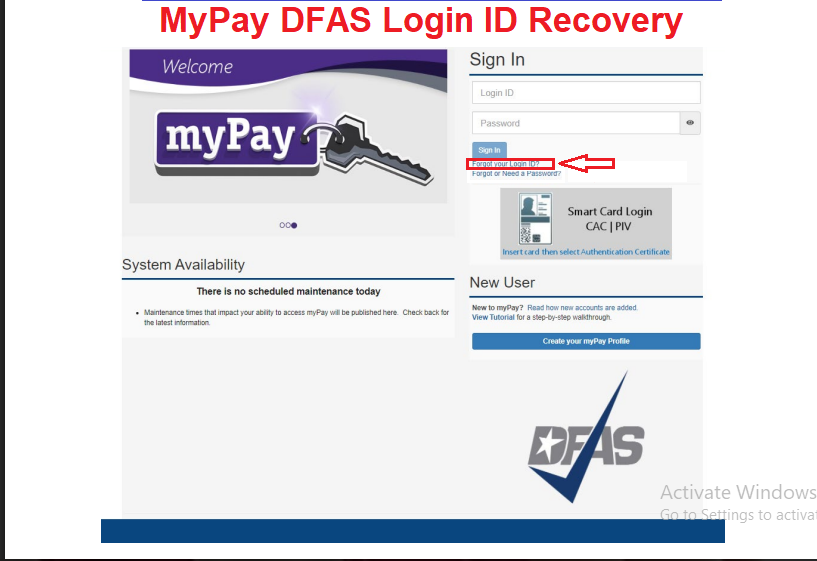
Step 2: Click the ”Forgot your Login ID?” link on the myPay homepage under the “Sign In” box
Step 3: Enter your Social Security Number and Password to display your Login ID on screen, or enter your Social Security Number and registered email address to receive your Login ID by email.
If you entered your Social Security Number and Password, your Login ID will appear on the screen. Click Finish when you’re ready to log in using your Login ID and password.
If you entered your Social Security Number and registered email address, your Login ID will be mailed to your registered email address. When you receive your Login ID in the mail, log in using the “MyPay DFAS Sign In” box on the myPay home page
Step 4: Your Login ID and password are the keys to keeping your retired or annuity pay account current, so be sure to remember them!
MyPay DFAS Password Recovery
If you remember your Login ID but cannot remember your password, use the password assistance option on the official website. Here is the general recovery process:
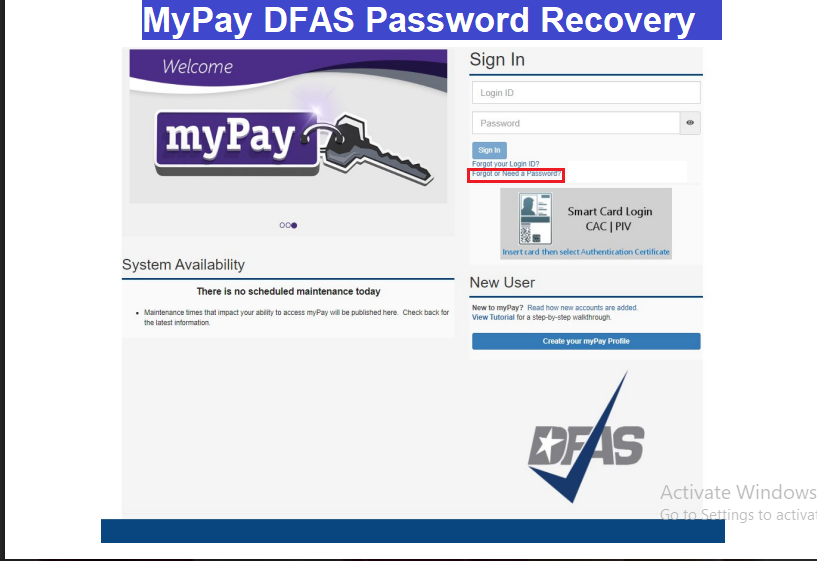
Step 1: 1. Click the ”Forgot or Need a Password?” link on the myPay homepage.
Step 2: Enter two of the following: your Login ID, Social Security Number, and/or email address. Check the box affirming you are the account owner, and click “Continue”.
Step 3: If you completed the security questions, you’ll be presented with three security questions to answer. When finished answering the questions, click “Check my Answers”.
Step 4: If you haven’t set up security questions or answer them incorrectly, you’ll get the option to have a temporary password sent to you.
Step 5: Once you succeed in answering the security questions, you’ll be prompted to create a new password. Please follow the guidelines provided on the page to create a strong password. Enter your new password twice, then click the “Change Password” button.
Step 6: Your Login ID and password are the keys to keeping your retired or annuity pay account current, so be sure to remember them!
What If You Cannot Answer Your Security Questions?
If you have not set up security questions or cannot answer them correctly, DFAS may offer another way to receive a temporary password. Available delivery methods can include:
- Text message to a mobile number registered with myPay.
- A government or agency email address on file.
- Postal mail to the address associated with your account, where available.
Follow the options displayed during the recovery process. DFAS can only send recovery information through eligible contact methods already associated with your account.
How to Use a Temporary MyPay Password
If DFAS sends you a temporary password, you will need to return to the official myPay website to use it. The general process is:
- Open the MyPay DFAS homepage.
- Enter your Login ID.
- Enter the temporary password supplied by DFAS.
- Select Sign In.
- Complete any required identity verification.
- Follow the instructions to establish a new password if prompted.
A temporary password is intended to help you regain access. Do not treat it as a permanent password or share it with anyone.
If the temporary password does not work, check that you entered it exactly as provided and that you are following the instructions in the DFAS message. If the problem continues, contact myPay support.
What If Your MyPay Password Has Expired?
Some users discover that their password has expired after going several months without signing in. This can happen when an account is used infrequently, such as when a retiree logs in mainly to download an annual tax statement.
An expired password does not necessarily mean that your entire account has been deleted. To regain access:
- Visit the MyPay DFAS website.
- Select Forgot or Need a Password?
- Provide two of the requested account details.
- Complete the available identity verification process.
- Reset your password or request a temporary one if offered.
- Return to the MyPay DFAS sign-in page and follow the instructions.
Once you regain access, review your registered email address and phone number so that future recovery requests are easier to complete.
What If You No Longer Have Access to Your Registered Email or Phone?
This is a common difficulty for people who have changed mobile numbers, switched email providers, or stopped using an old account.
Because myPay uses previously registered contact information for certain recovery procedures, you may not be able to receive a verification code or temporary password through a contact method you no longer control. If this happens:
- Check whether another eligible recovery method is offered.
- Avoid repeatedly submitting information that you know is outdated.
- Contact the myPay Customer Care Center for guidance.
- Ask about updating your registered contact information through an approved identity verification process.
For security reasons, DFAS may need to verify your identity before making changes to account contact details.
How to Get Help If MyPay Password Recovery Fails
If the online recovery process does not work, DFAS provides customer support for myPay account access and technical problems. You can use these official options:
MyPay Customer Care Center
- Toll-free phone: 1-888-332-7411
- Commercial phone: (216) 522-5096
- DSN: 580-5096
- Published hours: Monday through Friday, 8 a.m. to 5 p.m. Eastern Time.
For in-person password assistance, DFAS also provides a Trusted Agent service. Visit the official myPay website and select Contact Us to find the relevant information.
Support hours and available services can change, so check the official DFAS contact page before calling.
Important Security Tips During Account Recovery
Your myPay profile may contain personal, financial, and employment-related information. Protecting your details is especially important when recovering access. Keep these precautions in mind:
- Only use the official website at https://mypay.dfas.mil/.
- Do not send your password or one-time PIN to anyone.
- Do not share your full Social Security number in blog comments, social media messages, or unofficial support forms.
- Never give your temporary password to another person.
- Be cautious of emails or text messages that direct you to unfamiliar login pages.
- Use a unique password that you do not reuse on other websites.
- Keep your registered email account and mobile phone secure.
This website is not a DFAS support service. Never submit your Login ID, password, Social Security number, or verification code through our contact form.
MyPay DFAS Password and LoginID Frequently Asked Questions
How do I find my forgotten myPay Login ID?
Visit the official myPay homepage and select Forgot your Login ID? Depending on the information you remember, you may be able to use your Social Security number and password or request that your Login ID be sent to your registered email address.
Can I recover my myPay Login ID without my password?
Yes. DFAS provides an option to request your Login ID using your Social Security number and the email address registered with your account, subject to identity verification.
How do I reset my myPay password without security questions?
If security questions are unavailable or cannot be answered correctly, DFAS may offer a temporary password through an eligible registered delivery method, such as text, government or agency email, or postal mail.
Can DFAS send my temporary password to a new email address?
Recovery information is generally sent through contact methods already registered with your account. If your email address is no longer accessible, contact myPay support to ask about the approved process for updating your details.
Why is my myPay account not accepting my temporary password?
Possible reasons include an incorrect entry, using an outdated temporary password, or not following the required recovery instructions. Carefully review the DFAS instructions and contact customer support if you still cannot sign in.
Does forgetting my password mean my myPay account has been deleted?
No. Forgetting or having an expired password does not automatically mean your account has been deleted. Use the official password assistance process to determine whether you can restore access.
Is there a fee to recover my myPay password?
Use the official DFAS recovery process and support channels. Be cautious of third-party websites or individuals asking for payment or sensitive information in exchange for account recovery.